
Wituski TubeLaser
CAM software for tube lasers — from 3D model to machine program and job quote
Open an assembly from a 3D CAD program. TubeLaser recognises the tubes and profiles, nests the parts on stock bars, generates the machine program and calculates the job price from your real costs. Simple parts can be designed from scratch using a library of 35 operations, without any 3D modelling.
Key capabilities
Wituski TubeLaser was developed on the shop floor, alongside daily production on a tube laser. It is built for process engineers, CNC programmers, operators and owners of job shops that cut tubes and profiles. It brings together everything that happens between the designer's drawing and the finished part: STEP import, operation editing, bar nesting, simulation and collision checking, the machine program and the customer quote.
Import assemblies from 3D CAD programs
A complete railing, frame or rack in one STEP file. The software recognises every tube, counts the quantities and loads each part with all its holes and mitres.
Quote a whole order in one click
Material, machine time, gas, energy and operator cost for every item. A ready PDF quote with your company and customer details.
Bar nesting and remnant stock
Parts are nested on stock bars with minimum scrap, including common-line cutting of mitres. Remnants go to stock and come back in later orders.
Machine-ready programs
.TXT programs for LX5410H / LX540 and G-code for Siemens, Fanuc, Beckhoff and Weihong. You can also configure your own post-processor.
Head collision check
Every move of the program, profile rotation included, is checked before saving. A program with a collision never reaches the machine.
Your data stays with you
Projects, prices and customer data are saved only on your computer. The software needs no internet connection to work.
Screenshots
Click an image to view it full size.
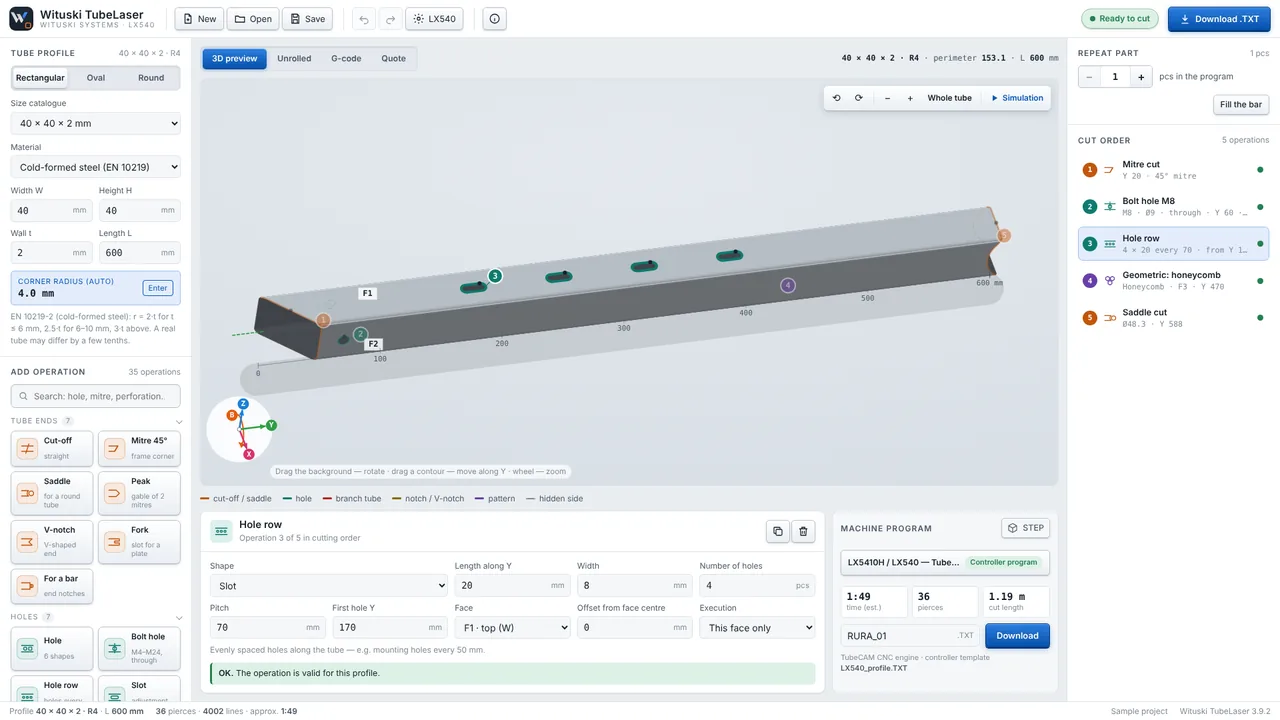
Designing a part in 3D
A 40 × 40 × 2 mm tube part: 45° mitre at the start, M8 bolt hole through both walls, a row of slots, a honeycomb perforation and a saddle for a Ø48.3 tube. Drag any operation with the mouse directly on the model and change its parameters in the panel alongside. The cutting order is on the right; cycle time, pierce count and cut length are at the bottom.
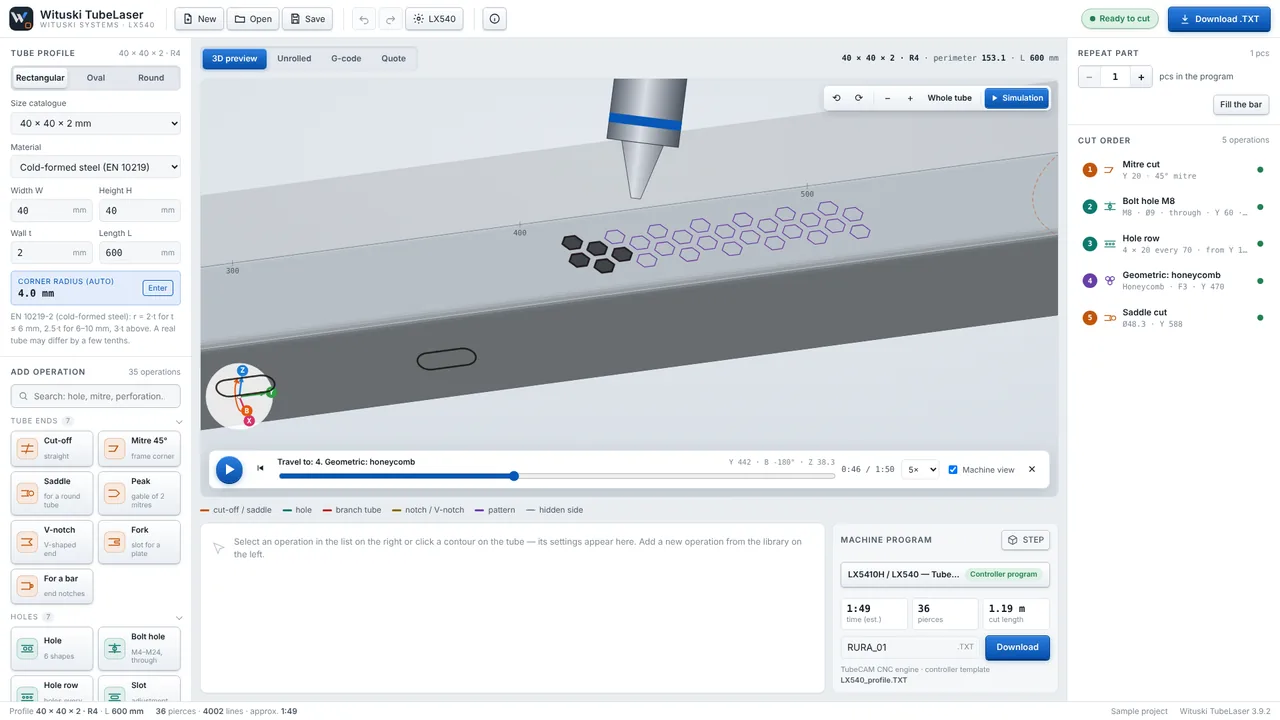
Cutting head simulation
The animation shows the head cutting the part contour by contour, including tube rotation. You can scrub through it and speed it up. Before the program reaches the machine, you can see the order and position of every cut.
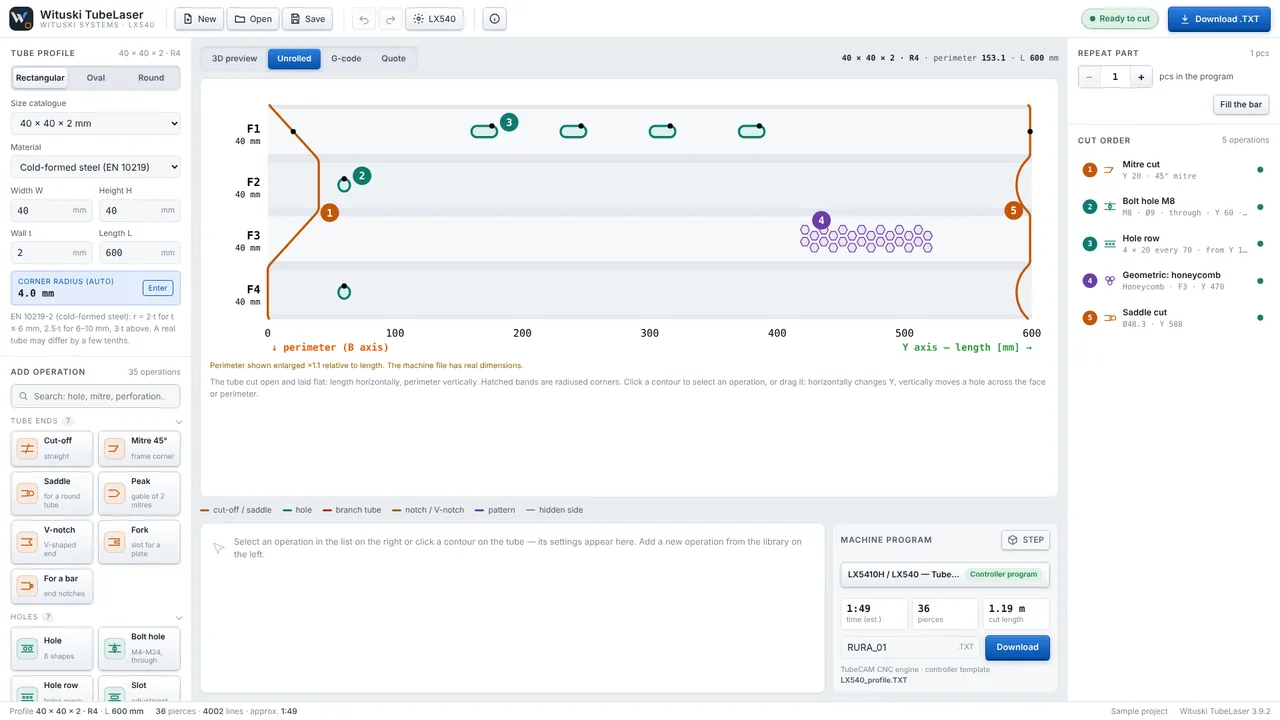
Dimensioned unrolled view
All faces of the profile laid out flat, with the position of every hole and cut-out dimensioned. Useful for checking the drawing with the designer and for inspecting the finished part.
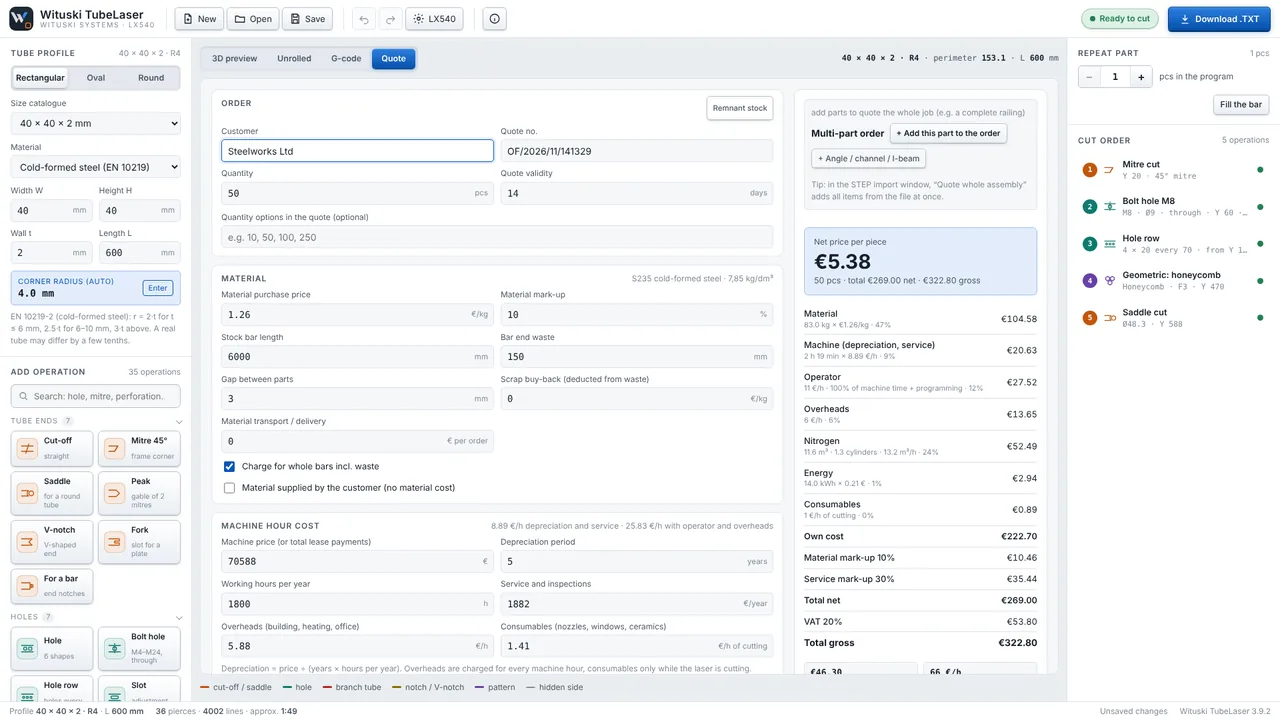
Part quote from real costs
Unit and order price: material, machine hourly rate (depreciation, service, operator, overheads), energy, nitrogen, setup, loading and mark-ups. The result shows own cost, profit and effective hourly rate. Print the numbered quote with its validity date or save it as PDF.
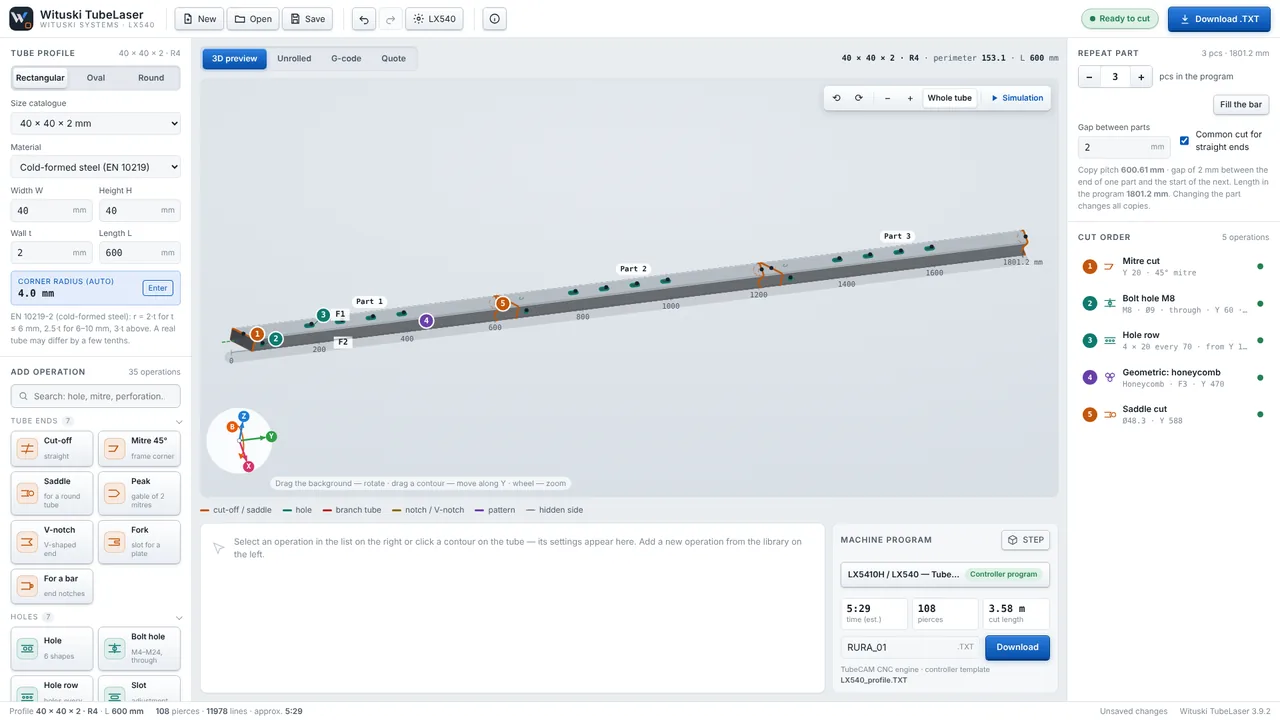
Several parts in one program
The same part repeated several times on one bar, with common-line cutting of straight ends or with a set gap. "Fill the bar" calculates how many parts fit on a stock length.
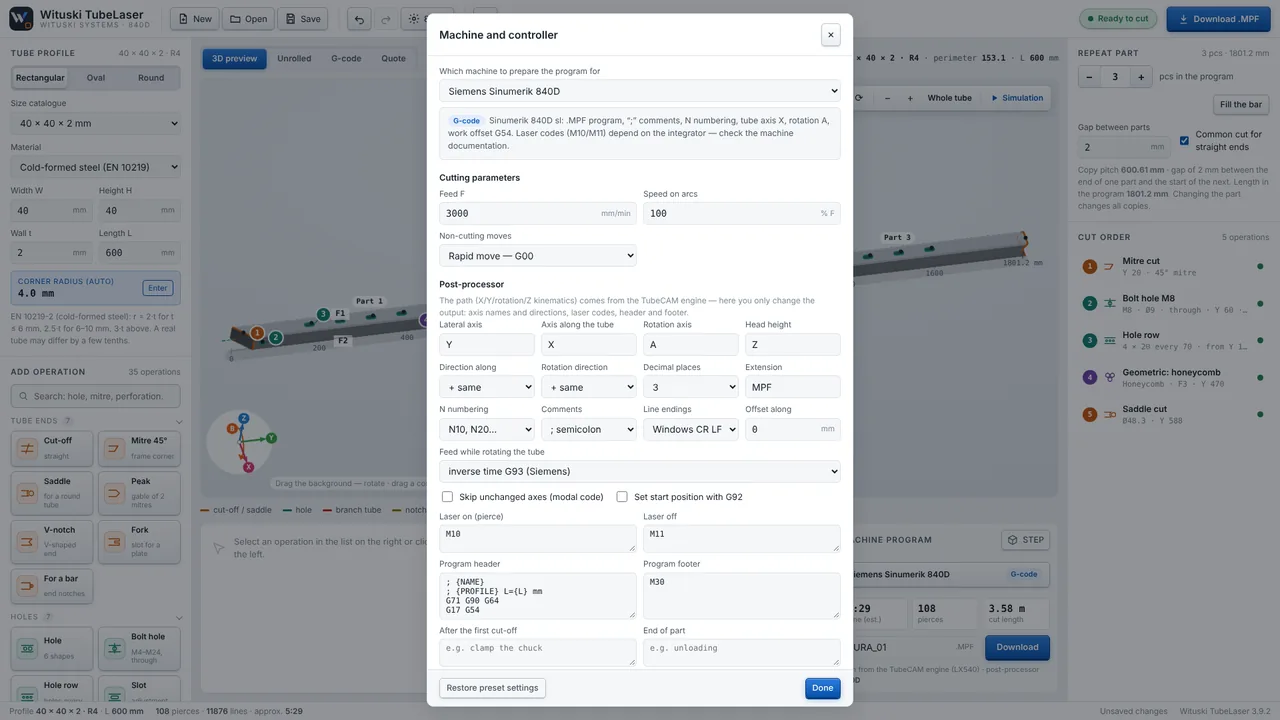
Post-processors and machine settings
Built-in post-processors: LX5410H / LX540, generic ISO, Siemens Sinumerik 840D, Fanuc 30i/0i, Beckhoff TwinCAT and Weihong / NcStudio. You can also build your own: axes, directions, offsets, laser codes, program header and footer.
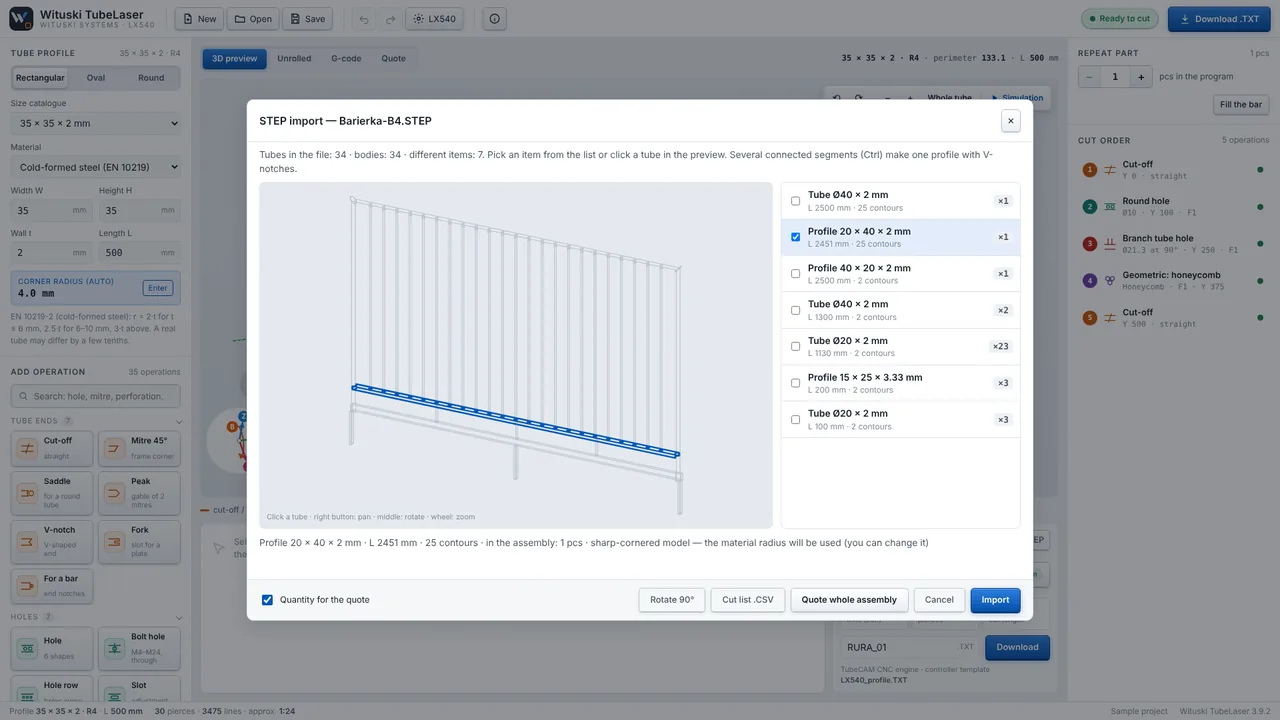
Importing an assembly from STEP
A railing designed in a 3D CAD program: 34 tubes grouped into 7 different items with quantities. Pick a tube from the list or click it on the 3D model. From the same window you can export a CSV cut list for Excel in one click, or send the whole assembly to the quote at once.
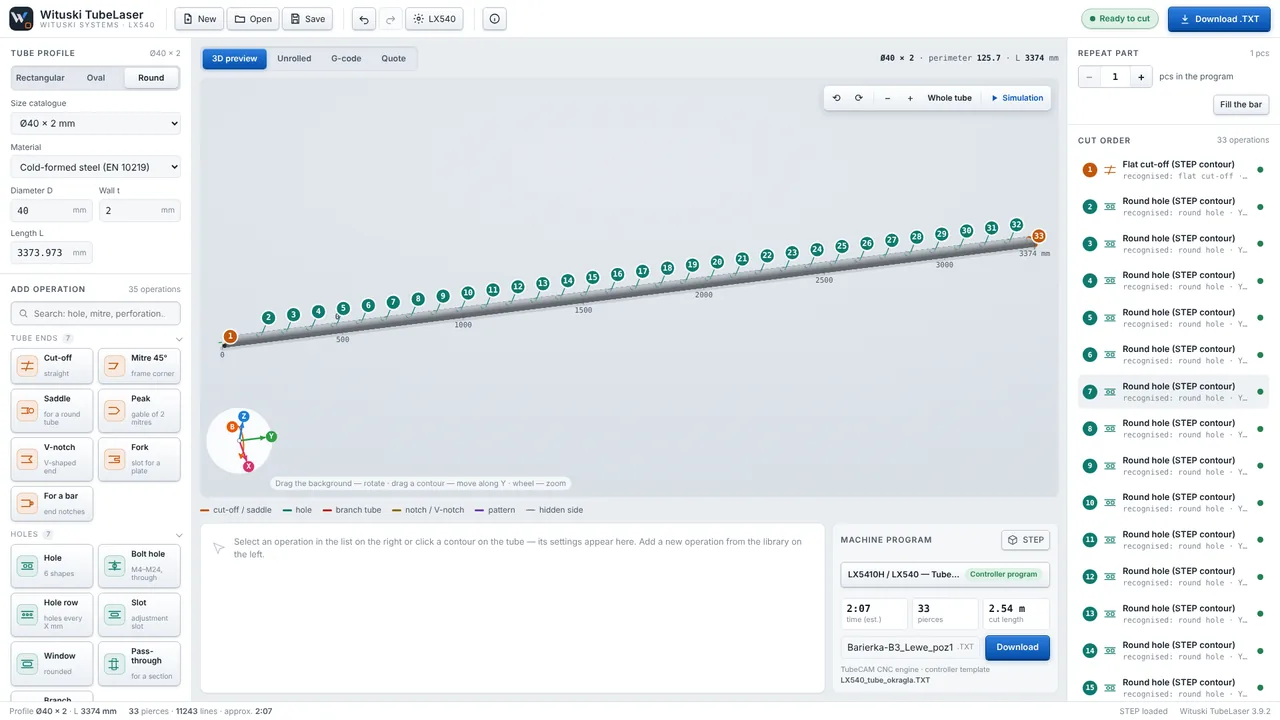
Part loaded from a STEP model
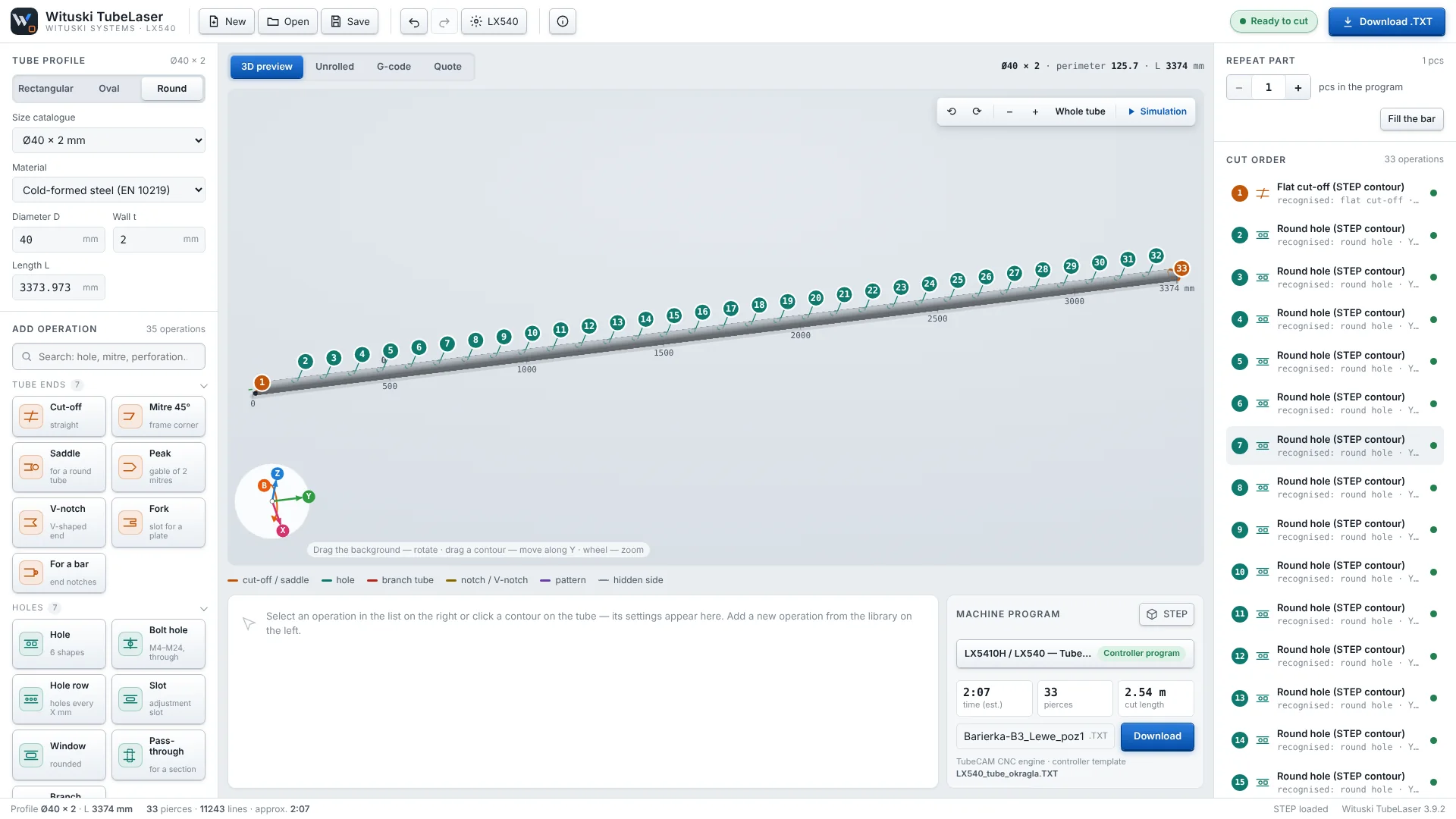
A railing tube after import: 33 operations recognised automatically, including cut-offs, mitred ends and holes for bars. Standard holes become editable operations, so you can change diameter or position without going back to CAD. The software sets the cutting order along the tube to shorten head travel.
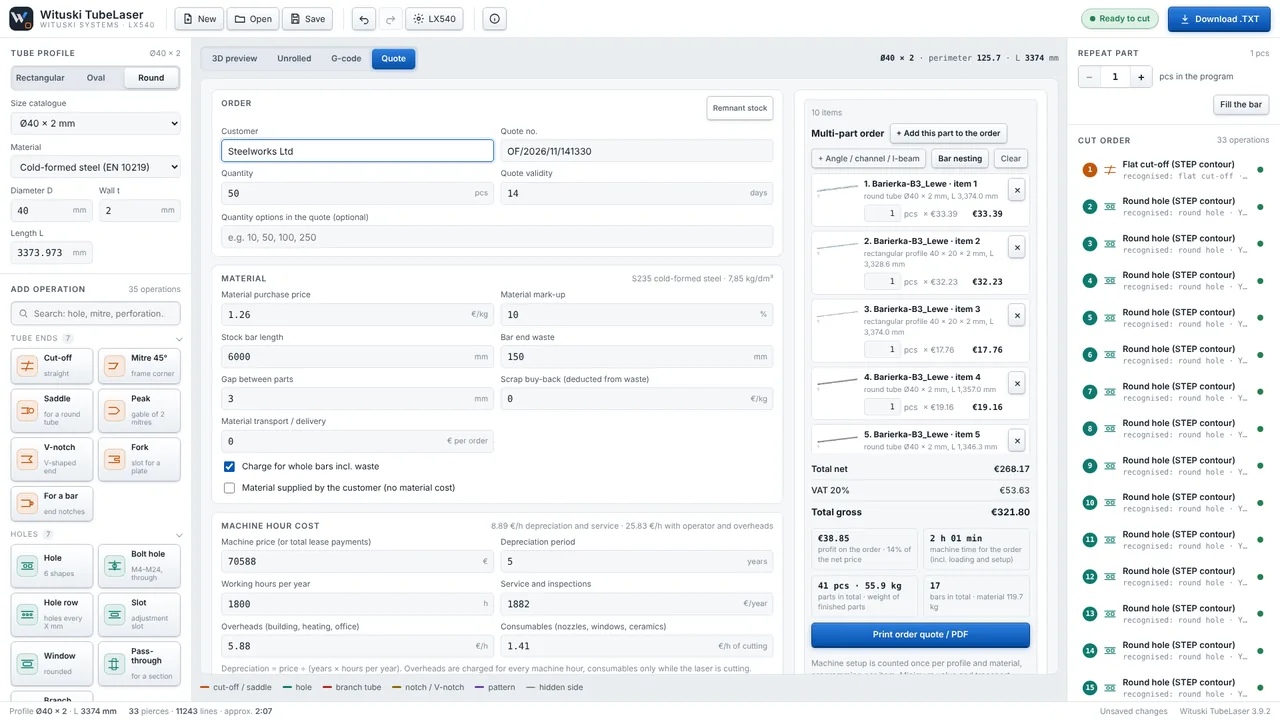
Quoting a whole order
All railing items in one quote, each with a thumbnail, profile, length, quantity and price. The software totals net and gross value, profit, machine time, finished part weight and the number of stock bars needed. Machine setup is counted once per profile, not for every item.
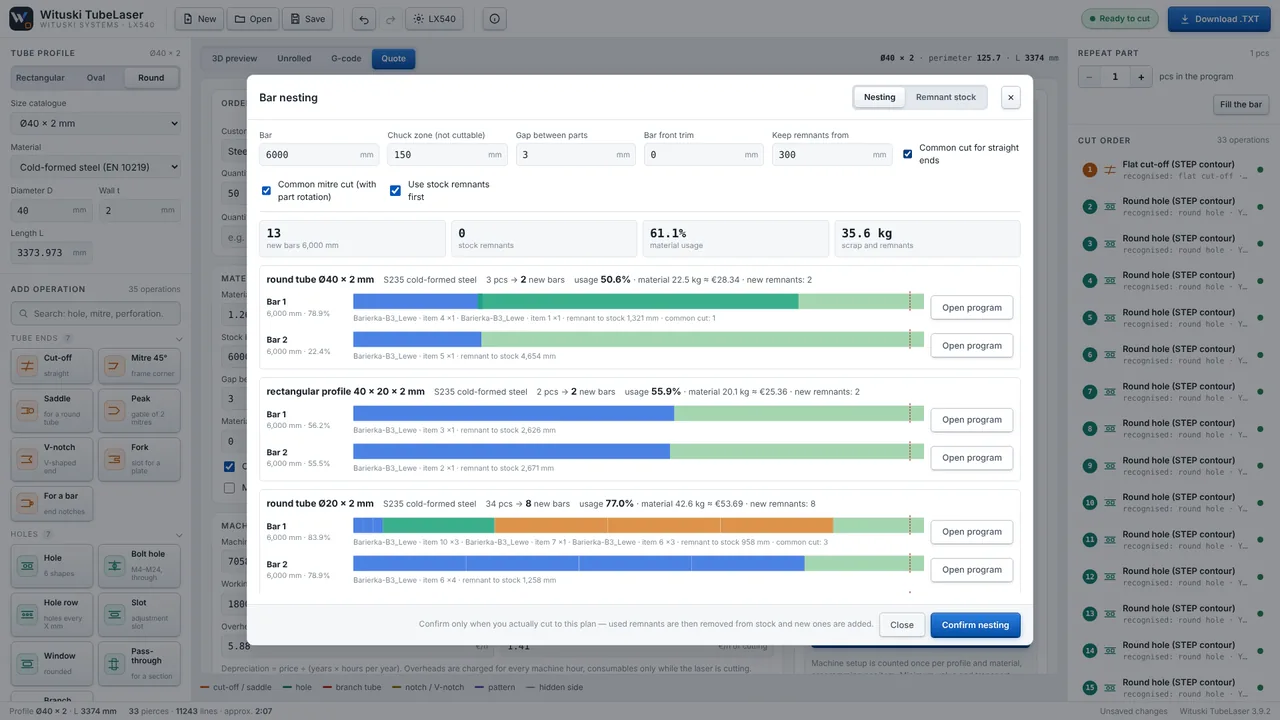
Bar nesting
Parts from the whole order nested on 6 m bars, separately for each profile, with material usage and scrap. Adjacent parts can share a cut, mitres included: the software rotates a part by 180° automatically. Each bar opens as a ready machine program.
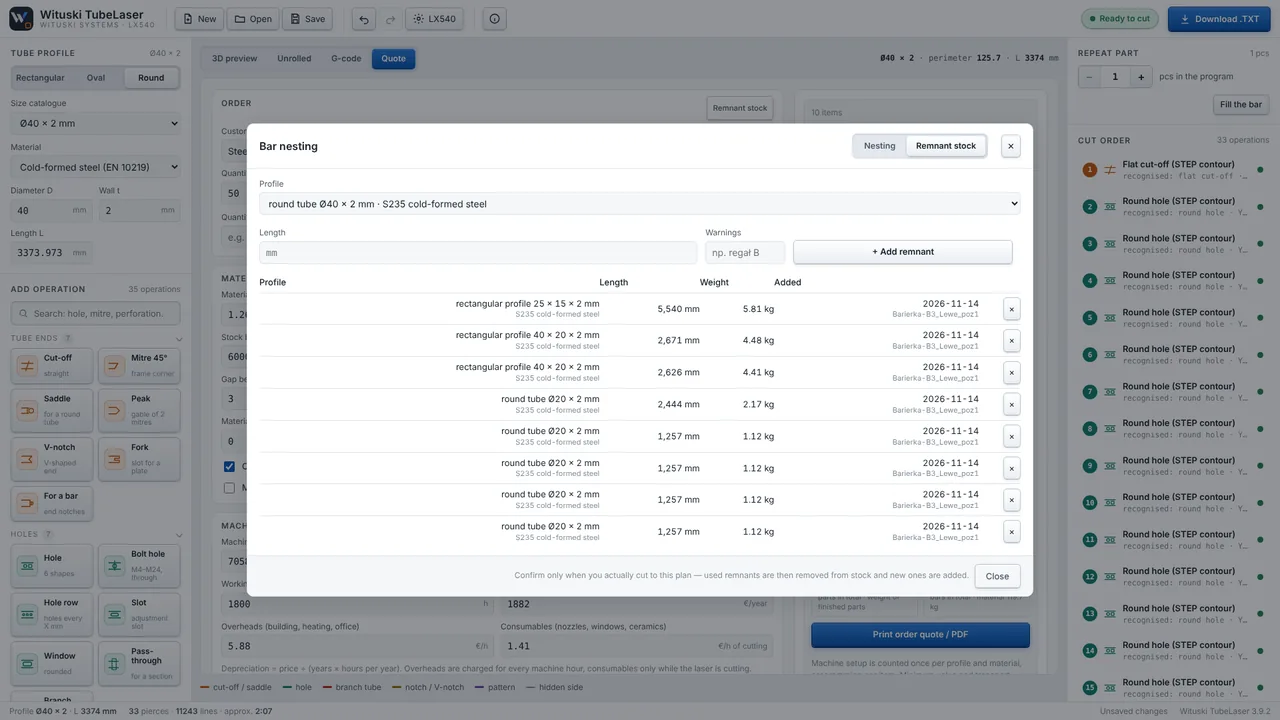
Remnant stock
Once the nesting is confirmed, remnants above a set length go to stock with profile, length, weight and date. In later orders the software uses remnants first and only then new bars. Remnants can also be added by hand, for example with a rack location.
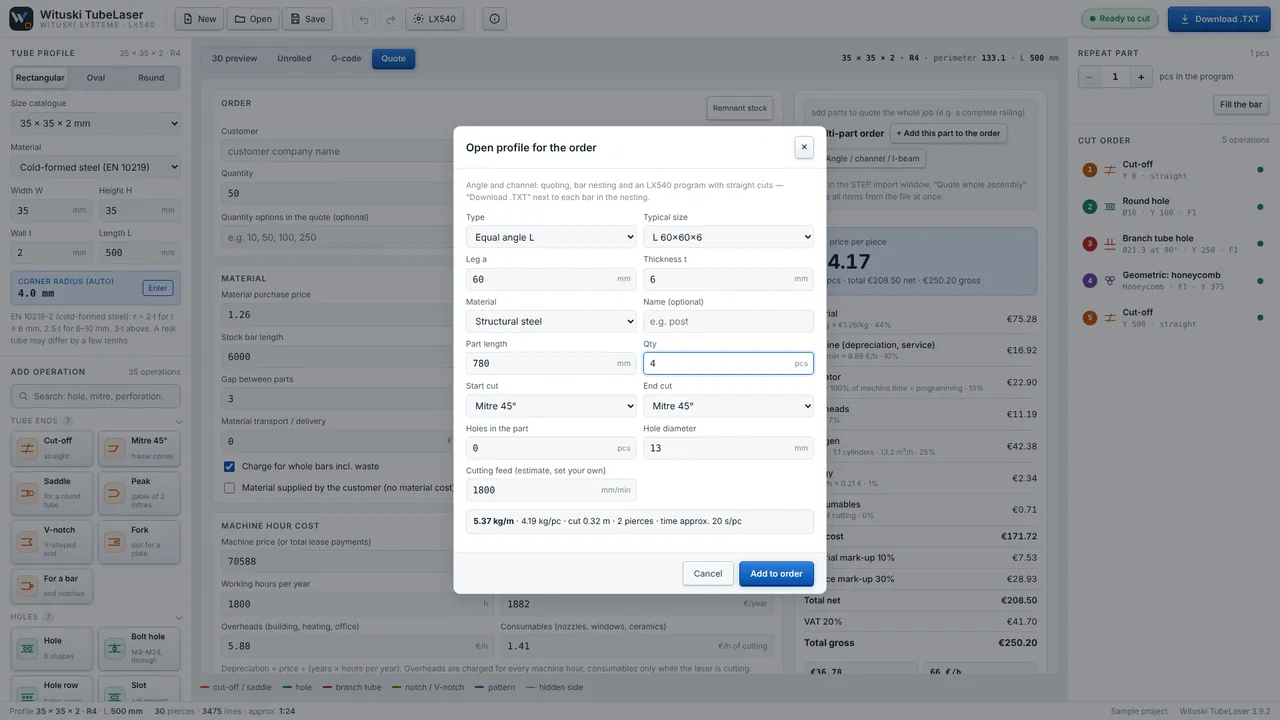
Angles and channels
Open profiles, equal angles and cold-formed C channels, from a catalogue of standard sizes or with any size entered. Set straight cuts or 45° mitres; the software shows weight, cut length and time. The parts go into the quote, bar nesting and the LX540 machine program.
Full feature list
Import from 3D CAD programs
- STEP (.step, .stp) and solid IGES (.igs, .iges) files from 3D CAD programs supporting these formats.
- Single parts or complete assemblies: railings, frames, racks, structures of dozens of tubes.
- Automatic recognition of every tube and profile: section, wall, length, number of contours.
- Identical parts grouped into items with their assembly quantity.
- 3D assembly preview: click a tube on the model or pick it from the list.
- CSV cut list for the whole assembly in one click.
- Quote the whole assembly in one click, with assembly quantities.
- Parts load with all cut-offs and holes, including mitred ends.
- Standard holes and cut-offs become editable operations.
- Several connected segments merge into one profile with V-notches for bending.
- Models drawn with sharp corners get the real material corner radius.
- Cutting order set automatically along the tube.
Profiles and materials
- Rectangular, square, flat-oval and round tubes.
- Equal angles and cold-formed channels: quoting, nesting and LX540 program (straight cuts and 45° mitres).
- Catalogue of standard commercial sizes or any size.
- Cold-formed S235 steel, hot-finished steel, stainless steel, aluminium.
- Corner radius to EN 10219-2 / EN 10210-2 or entered from measurement.
Library of 35 operations
- Tube ends (7): straight cut-off, 45° mitre, saddle for round tube, peak, V-notch, plate fork, bar notches.
- Holes (7): hole in 6 shapes, M4–M24 bolt hole, hole row, adjustment slot, window with corner radius, profile pass-through, branch tube hole.
- Notches and bending (3): side notch, V-notch for bending, bent frame.
- Patterns and perforations (10): round perforation, honeycomb, ventilation slots, diamond mesh, obrounds, staggered squares, herringbone, louvres, 25 mm raster, lightening holes.
- Assembly (8): tabs and slots, galvanizing holes, M4–M12 rivet nuts, DIN 929 weld nuts, tapped holes, dowels and pins, foot with rivet nut.
Editing and checks
- Drag operations with the mouse on the 3D model and the unrolled view.
- Operation search, duplicate, undo / redo, keyboard shortcuts.
- Contour, bridge and corner-zone checks, with warnings before saving.
- Perforations set by open area in percent, with a minimum bridge check.
Preview, simulation and safety
- 3D preview with machine axes X, Y, Z, B.
- Dimensioned unrolled view.
- Animated head simulation with seek.
- Cutting time, pierce count, cut length, program line count.
- Head collision check for every program move: a program with a collision is not saved.
Nesting and remnant stock
- Nest a whole order on stock bars, with usage and scrap for every bar.
- Common-line cutting of adjacent parts, including mitres with 180° part rotation.
- Adjustable chuck zone, part gap and bar front trim.
- Many layouts tested; the best one wins: fewest bars and longest remnant.
- Every bar as one machine program.
- Remnant stock used in later nestings.
Machine programs
- LX5410H / LX540: .TXT program with feed, arc, rapid move and tail settings.
- TubeCAM project import (.json).
- G-code post-processors: ISO, Siemens Sinumerik 840D, Fanuc 30i/0i, Beckhoff TwinCAT, Weihong / NcStudio.
- Custom post-processor: axes, directions, offsets, number format, comments, line numbers, laser codes, header and footer.
- Correct feed during tube rotation for generic controllers.
- STEP export to FSCUT / TubesT and other CAM software.
Quoting and offers
- Machine hourly rate from price, depreciation, working hours and service.
- Operator, overheads, consumables, energy, nitrogen.
- Material: price per kg, bar usage, offcut, scrap credit, customer-supplied material.
- Setup, programming, loading, unloading, deburring, packing, transport.
- Separate mark-ups for material and service, minimum order value, rounding, VAT.
- Several quantity options in one quote.
- Quote with company and customer details: print or PDF. Currencies PLN, EUR, USD, GBP, CZK, CHF.
Everyday work
- Autosave, .tlproj projects open with a double-click.
- Polish and English interface, light and dark theme.
- All data stays on the user's computer.
Licensing and price
one-month trial · local price in other countries
Wituski TubeLaser is available in the Microsoft Store as an annual subscription: PLN 699.99 per year (local price in other countries), with a one-month trial. Purchase, renewal and cancellation are handled by Microsoft in your account.
Without a subscription you can design, import STEP files, view the preview and simulation and prepare quotes. Saving machine programs, STEP export and copying code require an active subscription.
System requirements
- Windows 10 or Windows 11, 64-bit.
- 4 GB RAM (8 GB recommended for large STEP assemblies).
- About 500 MB free disk space.
- Full HD display or larger.
Frequently asked questions
Does it work with my machine?
LX5410H / LX540 is fully supported. For other G-code tube lasers there are built-in post-processors (Siemens, Fanuc, Beckhoff, Weihong, ISO), and if your controller is not covered, you can configure your own. Parts can also be moved to FSCUT / TubesT via STEP export.
Do I have to model parts in 3D?
No. Simple parts are built from the library of 35 operations. STEP files from 3D CAD programs are useful for assemblies and non-standard shapes.
Are my projects sent to the internet?
No. Projects, prices and customer data stay on your computer. The software only contacts the Microsoft Store to check the subscription status.
Where do I start on a new machine?
Before the first cut on a new machine or with a new post-processor, perform a dry run and a test cut on scrap material.
Try Wituski TubeLaser for a month
Get it from the Microsoft Store and test it on your own projects.